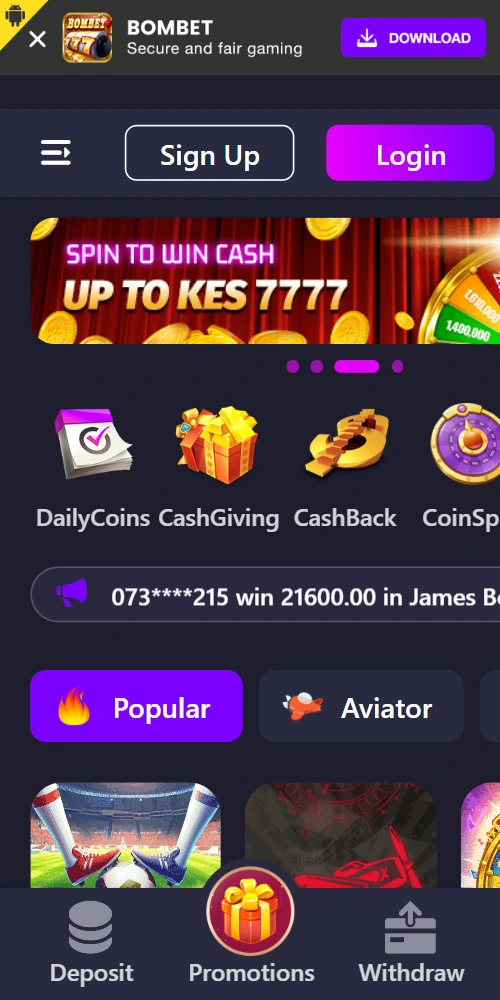
The Bombet Kenya mobile application delivers full sportsbook and casino access through native Android and iOS builds optimized for Kenyan network conditions. Download the app to your handset and you'll get M-Pesa integration, push notifications for live match updates, and one-tap bet placement without browser limitations.
Native applications bypass browser constraints that limit session persistence and notification delivery. The Bombet Kenya app maintains logged-in status across device restarts, caches game assets for faster load times, and pushes real-time alerts when your accumulator hits or a withdrawal completes—none of which work reliably in mobile Safari or Chrome.
⚡
Instant bet placement
Pre-loaded bet slips and cached odds data mean you can place wagers in under two seconds, even on congested 3G networks during peak football hours.
🔔
Push notifications
Get alerts for goal updates, cashout opportunities, bonus credits, and withdrawal confirmations sent directly to your lock screen.
📱
Offline account access
View betting history, pending bets, and account balance without an active connection; the app syncs changes once you're back online.
💳
One-tap M-Pesa deposits
Save your M-Pesa number in the app settings and authorize deposits with a single confirmation—no need to re-enter Paybill details each time.
🎮
Full game library
Access the complete catalog of slots, crash games, live dealer tables, and sports markets identical to the desktop site, just optimized for touch controls.
🔒
Biometric login
Unlock your account with fingerprint or face recognition instead of typing passwords, cutting login time from 15 seconds to under three.
Installing the app on your device
Both Android and iOS versions require manual installation steps because Kenyan app stores restrict real-money gambling software. The process takes 3-5 minutes and doesn't require any technical skill beyond adjusting a security setting temporarily.
Android download steps
Open your phone's Settings app and navigate to Security or Privacy (varies by manufacturer)
Locate "Install unknown apps" or "Unknown sources" and enable it for your browser (Chrome, Firefox, etc.)
Visit bombet-kenya.com/app on your mobile browser and tap the Android download button
The APK file (roughly 45MB) downloads to your device—wait for the notification to confirm completion
Open the downloaded file from your notification shade or Downloads folder
Android prompts you to confirm installation; tap Install and wait 20-30 seconds
Once installed, you can disable "Unknown sources" in Settings if you prefer tighter security
Launch the app from your home screen or app drawer and sign in with your existing Bombet Kenya credentials
The Android app works on devices running version 5.0 (Lollipop) or newer, covering basically every smartphone sold in Kenya since 2015. Storage requirements sit at 120MB after installation with cached data.
Open Safari on your iPhone or iPad and go to bombet-kenya.com/app
Tap the iOS download button; Safari prompts you to install a configuration profile
Select Allow when the download dialog appears, then open Settings
Navigate to General > VPN & Device Management (or Profiles on older iOS versions)
Locate the Bombet Kenya profile and tap Install, entering your device passcode when prompted
After installation completes, return to your home screen—the Bombet Kenya icon appears within 10-15 seconds
First launch triggers a trust verification; go back to Settings > General > VPN & Device Management
Tap the developer profile under Enterprise App, then select Trust
Return to your home screen and launch the app; sign in with your account details
iOS app requires version 12.0 or later, supporting iPhone 6s and newer models. The download size runs 52MB, expanding to 140MB with game cache. iPads running iPadOS 13+ also support the app, though the interface scales better on phone-sized screens.
The mobile web version of Bombet Kenya functions adequately for casual betting, but the native app outperforms it across performance metrics and feature availability. Below you'll see where each platform excels and where limitations emerge.
Feature
Mobile App
Mobile Browser
Login persistence
Stays logged in indefinitely
Sessions expire after 24 hours
Bet placement speed
1-2 seconds average
3-5 seconds with network lag
Push notifications
Real-time alerts for all events
Not supported
Offline functionality
View history and balance
Requires constant connection
Biometric login
Fingerprint and face unlock
Password entry only
M-Pesa integration
Saved payment details
Manual entry each time
Game loading time
Instant with cached assets
2-4 seconds per game
Data consumption
15-20MB per hour of use
25-30MB per hour
Battery drain shows minimal difference—both consume roughly 8-10% per hour of active use on mid-range Android devices like the Samsung Galaxy A series. The app does maintain a background process for notifications, adding about 2-3% to daily battery usage even when closed.
System requirements and compatibility
Bombet Kenya tests app builds on popular Kenyan handset models to ensure compatibility across price segments. Budget devices from brands like Tecno, Infinix, and iTel run the app without performance issues, provided they meet minimum OS versions.
Android requirements
Operating system: Android 5.0 or higher
RAM: 2GB minimum (3GB recommended for smooth multitasking)
Storage: 120MB free space
Screen resolution: 720x1280 or better
Internet: 3G/4G or Wi-Fi connection
iOS requirements
Operating system: iOS 12.0 or later
Compatible devices: iPhone 6s and newer, iPad Air 2 and newer
Storage: 140MB free space
Internet: 3G/4G/5G or Wi-Fi
Screen: Retina display or higher
Network performance varies significantly across Kenyan mobile operators. Safaricom 4G users in Nairobi, Mombasa, and Kisumu experience seamless streaming and instant bet updates. Airtel and Telkom customers sometimes face slower load times in rural counties like Turkana or Marsabit, where 3G remains the primary connection type—but the app's caching mitigates most delays.
Most installation failures stem from security settings blocking third-party apps or insufficient storage space. Android users encounter "Installation blocked" errors when Unknown Sources remains disabled, while iOS users see trust warnings if they skip the profile verification step.
"App not installed" error (Android)
This message appears when your device lacks storage space or an older version conflicts. Delete the previous APK from your file manager, clear 200MB of storage, then retry the download. If the error persists, restart your phone before attempting installation.
"Untrusted Enterprise Developer" (iOS)
Apple blocks enterprise apps until you manually verify the developer. Go to Settings > General > VPN & Device Management, locate the Bombet Kenya profile, and tap Trust. The app launches normally after this one-time approval.
App crashes on launch
Outdated OS versions cause stability issues. Update Android to at least 7.0 or iOS to 13.0 for optimal performance. If your device can't upgrade further, the mobile browser remains your best option.
M-Pesa deposits not processing
Check you've saved your M-Pesa number correctly in app settings—missing the 254 country code prefix causes transaction failures. Also verify your Safaricom account has sufficient balance to cover both the deposit and Safaricom's M-Pesa fees.